添加夜间模式按钮
步骤一 安装夜间模式插件 :
1
| npm install hexo-next-darkmode --save
|
步骤二 往 NexT 主题的 _config.yml 配置文件里添加以下内容 :
1
2
3
4
5
6
7
8
9
10
11
12
13
14
15
16
17
| # Darkmode JS
# For more information: https://github.com/rqh656418510/hexo-next-darkmode, https://github.com/sandoche/Darkmode.js
darkmode_js:
enable: true
bottom: '64px' # default: '32px'
right: 'unset' # default: '32px'
left: '32px' # default: 'unset'
time: '0.5s' # default: '0.3s'
mixColor: 'transparent' # default: '#fff'
backgroundColor: 'transparent' # default: '#fff'
buttonColorDark: '#100f2c' # default: '#100f2c'
buttonColorLight: '#fff' # default: '#fff'
isActivated: false # default false
saveInCookies: true # default: true
label: '🌓' # default: ''
autoMatchOsTheme: true # default: true
libUrl: # Set custom library cdn url for Darkmode.js
|
- isActivated: true:默认激活暗黑/夜间模式,请始终与 saveInCookies: false、autoMatchOsTheme: false 一起使用;同时需要在 NexT 主题的 _config.yml 配置文件里设置 pjax: true,即启用 Pjax。
自定义css样式
暗黑/夜间模式激活后,插件会将 darkmode–activated CSS 类添加到 body 标签上,你可以利用它覆盖插件默认自带的样式(如下所示),这样就可以实现暗黑/夜间模式 CSS 样式的高度自定义。
在themes/next/source/css/_custom.styl添加以下代码
1
2
3
4
5
6
7
8
9
10
11
12
13
14
15
16
17
18
19
20
21
22
23
24
25
26
27
28
29
30
31
32
33
34
35
36
37
| .darkmode--activated {
--body-bg-color: #282828;
--content-bg-color: #333;
--card-bg-color: #555;
--text-color: #ccc;
--blockquote-color: #bbb;
--link-color: #ccc;
--link-hover-color: #eee;
--brand-color: #ddd;
--brand-hover-color: #ddd;
--table-row-odd-bg-color: #282828;
--table-row-hover-bg-color: #363636;
--menu-item-bg-color: #555;
--btn-default-bg: #222;
--btn-default-color: #ccc;
--btn-default-border-color: #555;
--btn-default-hover-bg: #666;
--btn-default-hover-color: #ccc;
--btn-default-hover-border-color: #666;
--highlight-background: #282b2e;
--highlight-foreground: #a9b7c6;
--highlight-gutter-background: #34393d;
--highlight-gutter-foreground: #9ca9b6;
}
.darkmode--activated img {
opacity: 0.75;
}
.darkmode--activated img:hover {
opacity: 0.9;
}
.darkmode--activated code {
color: #69dbdc;
background: transparent;
}
|
取消夜间模式
- 当某个标签不想使用暗黑/夜间模式时,可以添加 darkmode-ignore CSS 类到标签上。
1
| <span class="darkmode-ignore">😬<span>
|
- 当然你也可以使用 isolation: isolate; CSS 样式来忽略暗黑/夜间模式。
1
2
3
| .button {
isolation: isolate;
}
|
- 也可以使用这种 mix-blend-mode: difference CSS 样式来还原暗黑/夜间模式。
1
2
3
| .button {
mix-blend-mode: difference;
}
|
常见问题
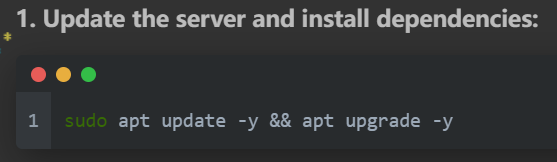
原因
- 在 Markdown 文件中,如果代码块未指定语言类型,语法高亮引擎可能无法正确解析 sudo。
- 主题颜色
解决方案
- 打开 NexT 的配置文件:
- 找到以下设置并修改高亮主题为支持亮色的夜间样式,例如 dracula 或其他亮色主题:
1
2
3
| highlight:
enable: true
theme: monokai
|
- 确保在代码块的开头指定正确的语言类型,例如 bash 或 shell:
1
2
3
4
5
| sudo apt install mariadb-server mariadb-client -y
or
sudo apt install mariadb-server mariadb-client -y
|
- 保存后运行以下命令以重新生成:
1
2
3
| hexo clean
hexo generate
hexo server
|